Wallester
FreelancersNew
Business
White‑Label
Company
Log inStart freeTry demo
  1. Home
  2. Blog
  3. Our products
  4. Corporate cards
  5. The Wallester Business App Has a New Dashboard. Here’s What’s Changed

20 November 20263 min read

The Wallester Business App Has a New Dashboard. Here’s What’s Changed

Inspired by
Matko Brusac
Matko Brusac
The Wallester Business App Has a New Dashboard. Here’s What’s Changed

The first screen of a business app is where you check how much money the company has and where it sits. We’ve now redesigned that screen in the Wallester Business mobile app, together with the profile settings, so the information you need most is the first thing you see.

The new design follows our updated brand identity and brings the app closer to the Client Portal. Whether you manage the company’s finances on a laptop or on your phone, the two now look and work in a similar way. The update is available on iOS and Android.
What’s new on the dashboard

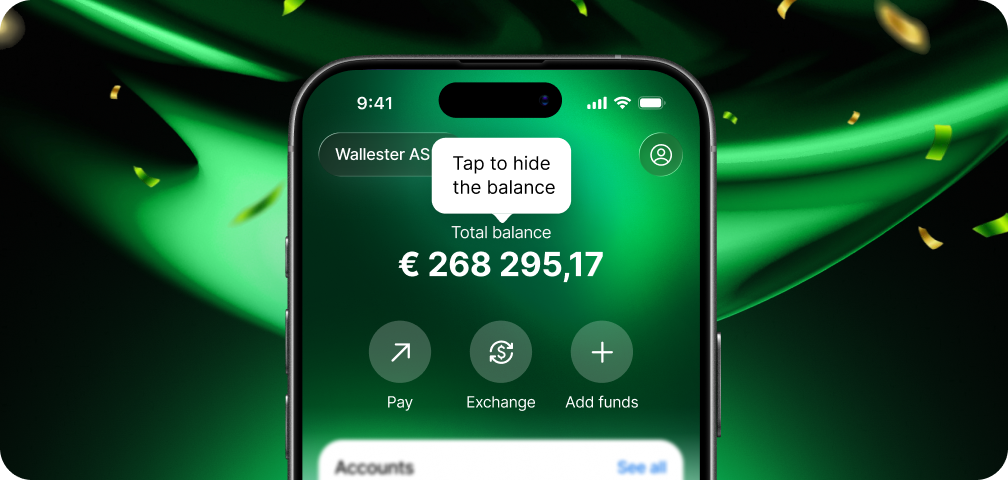
The dashboard is now built from widgets, with the features you use most at the top:

  • Accounts: up to three of your accounts appear under the action buttons, sorted by balance, with an option to view the rest. They used to have their own item in the bottom menu.
  • Balances & Currencies: a new section at the bottom lists your currency products and their balances. The product you’re currently using comes first, marked “Current”, and the others follow, newest first.
  • Action buttons: these are larger and easier to tap.

For a company that pays suppliers in euros and contractors in another currency, this means one look at the dashboard shows where the money is.

Balances when you want them

Not every moment is a good one for showing the company’s balance on screen, whether you’re in a meeting or on a train. You can now tap the total balance to hide the amounts across the dashboard, including account balances, currency balances and transaction amounts. Tap it again to bring them back. The app keeps your choice as you move between screens, and a short tooltip shows how it works.

Settings in a new place

Settings have moved under the Profile icon at the top of the screen. These screens now use the new design:

  • Settings
  • Company information
  • Contact support, which now shows our working hours in your local time

What’s coming next

For now, the Statement button is not on the dashboard. You can still find your statements on the Account screen, and the button will return once we’ve redesigned statements. Other screens you open from the dashboard keep their current design for now. This update covers Wallester Business company profiles.

To see the new dashboard, update the Wallester Business app from the App Store or Google Play.
Wallester Business
Share article
Press contactpress@wallester.com
Follow us
Wallester

Interested in Wallester?

Our sales team can help you get set up with the right solution to meet your business needs.

Contact sales

Find more articles

Top 10 Credit Cards in Germany in 2026
Corporate cards

Top 10 Credit Cards in Germany in 2026

By Wallester Blog29 October 202613 min read
The Best Virtual Cards for Google and Meta Ads in 2026
Corporate cardsEntrepreneurMedia and marketing

The Best Virtual Cards for Google and Meta Ads in 2026

By Wallester Blog22 October 202612 min read
Six Ways Finance Teams Lose Money Without Noticing
Corporate cards

Six Ways Finance Teams Lose Money Without Noticing

By Matko Brusac19 October 20265 min read
Top 10 Credit Cards in Italy in 2026
Corporate cardsExpense management

Top 10 Credit Cards in Italy in 2026

By Wallester Blog19 October 202616 min read
FreelancersNew

Something new is coming, be the first to know!

Visa card in colors
Explore
Business
Cards
  • Corporate cards
  • Virtual cards
  • Payroll cards
  • Platinum cards
Features
  • Expense management
  • Accounting integration
  • Budget analytics
Industries
  • Media buying
  • Online retail
  • Yacht management
  • Transport and logistics
  • Fleet management
  • Travel and hospitality
Others
  • Pricing
  • API solutions
  • Help Center
White‑Label
Payment cards
  • Virtual card
  • Prepaid card
  • Debit card
  • Credit card
  • White‑Label card
Platform overview
  • White‑Label solutions
  • Card issuing
  • BIN sponsorship
  • Payment processing
Services
  • Tokenization
  • 3D Secure
  • Fraud monitoring
  • KYC/KYB and AML
  • PSD2
  • Mobile app
  • Apple Pay
  • Google Pay
Solutions across industries
  • Banks
  • Business loan providers
  • Consumer loan providers
  • Digital assets & exchange platforms
  • E-commerce marketplaces
  • Employers & gig platforms
  • FinTech companies
  • Gift & rewards cards
  • Insurance companies
  • Membership & loyalty cards
  • Peer-to-peer loan providers
  • Streaming platforms
Developers
  • API documentation
  • Card issuing API
  • Open-source example
Company
  • About us
  • Why Wallester
  • Affiliate Program
  • Visa Principal membership
  • Media Pack
  • Contact us
  • Careers
  • Wallester blog
  • FAQ
  • Legal notice
  • Privacy policy
  • Cookie policy
  • Annual reports
  • Complaints handling procedure
  • Business account & card agreement
  • Your rights when making payments in Europe
  • Visa partner
  • Accessibility statement

© 2026 Wallester AS All rights reserved.Wallester AS is a Payment Institution, authorized by the Finantsinspektsioon (Estonian Financial Supervision and Resolution Authority), and an official Visa Principal Member. Registration code: 11812882.