A finance manager choosing cards for employee software, office supplies and travel has to answer several questions before the first purchase. Who needs a card? How will it be funded? Can an employee attach the receipt, and can finance retrieve it when checking the accounts?
A provider-selection checklist makes those requirements explicit. This guide gives UK small and medium-sized businesses ten checks to make, a scorecard for recording a provider trial and a practical starting point for an employee rollout.
What Are Business Expense Cards?
Business expense cards let authorised people pay for company purchases. An employer can issue cards to employees and set rules for their use, with transaction records available to the people responsible for managing the account.
The term describes the card's purpose. Funding depends on the product: purchases may use money held in a business account or a prepaid balance, or draw on an agreed credit facility. Check the card agreement for the funding arrangement, fees and any repayment terms before comparing providers.
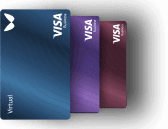
Physical cards can suit employees buying supplies or travelling. Virtual cards can suit online purchases and business subscriptions where the merchant accepts them. A card's format says nothing about whether it offers credit or will be accepted for a particular hotel or car-hire deposit.
How Do Employee Expense Cards Work?
The business applies for an account, completes the provider's checks and appoints people to administer it. Once approved, the company funds the account or uses the agreed credit arrangement, issues cards and grants the appropriate employee access.
The administrator sets the available card controls. Employees use their assigned cards for authorised purchases and provide receipts or other supporting records. Finance reviews the transactions and transfers the necessary information into its accounting process.
Write down which rules are company policy and which the platform enforces. A monthly card limit restricts an amount; it does not confirm that every purchase within that amount has a valid business purpose. Employees still need instructions about permitted spending, missing receipts and exceptions.
Benefits and Practical Limits
Company-funded purchases. An employee can make an authorised purchase using company funds, reducing the occasions when they need to pay personally and claim reimbursement. The business must keep enough funds available and provide an alternative for purchases the card cannot cover.
Visible spending. Card records help finance identify the merchant, amount and card used. A transaction record needs supporting context: the employee may still have to explain the business purpose or supply a receipt.
Individual controls. Limits and access permissions help an administrator manage employee purchasing. Finance should test how those settings work and document who can change them, including during an employee's absence or departure.
Receipt collection. Attaching a receipt to its transaction puts supporting evidence alongside the payment record. Check how the image or file reaches accounting; a receipt attached in one system does not automatically appear in another.
The Provider-Selection Checklist
Start with your intended users and purchases. Ask each provider for the same evidence and record your decision in the final column. Treat an unanswered requirement as unresolved until someone checks it.
| Requirement | Evidence to Request | Practical Check | Your Decision |
|---|---|---|---|
| Eligibility | Supported business locations, company types and cardholders. | Confirm that your business and intended users qualify. | |
| Funding and Card Type | Card agreement, funding options and any credit terms. | Trace how one planned purchase is funded and what happens if funds are insufficient. | |
| Physical and Virtual Cards | Card allowances, delivery charges and replacement terms. | List employees needing physical cards and purchases needing virtual cards. | |
| Limits and Access | Available limits, permissions and freeze controls. | Ask an authorised administrator to demonstrate a limit change and card freeze. | |
| Receipts and Records | Receipt attachment, notes, reminders and export options. | Attach a sample receipt and retrieve it alongside the correct transaction. | |
| Accounting Connection | Exact software edition, mapped fields and attachment support. | Review an export or authorised test connection with your accountant. | |
| Currency Costs | Funding, conversion and card-transaction charges. | Calculate the charges for your actual account and purchase currencies. | |
| Total Cost | Plan, users, cards, delivery and separately charged operations. | Compare identical usage assumptions over the same billing period. | |
| Support and Exceptions | Contact channels, service hours, refund and dispute processes. | Confirm how employees and finance report a lost card or disputed transaction. | |
| Exit and Offboarding | Record export, user removal, card closure and pending payments. | Check record access and recurring supplier payments before removing a user. |
For a team buying software, count recurring subscriptions and the number of people administering them. For travelling employees, check physical-card requirements and deposits with the relevant merchant. If contractors also need purchasing access, use a separate eligibility check; the employee process may not cover their arrangement.
Use a Trial Scorecard
Copy the scorecard below for each requirement you consider mandatory. Keep the provider's answer separate from the result of your own test. Use an authorised account and a low-value purchase where a payment is necessary; obtain permission before sharing company or employee information.
| Field | Your Entry |
|---|---|
| Provider / Plan | |
| Requirement | |
| Must-Have or Optional | |
| Provider Answer | |
| Source and Date | |
| Test Outcome: Pass, Fail or Not Tested | |
| Unresolved Question | |
| Finance Owner |
Fictional example: a finance manager requires the merchant, amount, currency and receipt reference for an office-supplies purchase. The provider says transaction export is supported. In an authorised trial, the manager finds the transaction fields in the export but has not established how the receipt is retrieved. The requirement remains unresolved until that step is tested.
Keep that result with the date and the person responsible for checking it. A provider may support your accounting software while handling receipts differently from the process your finance team expects. One successful payment is only one part of a usable trial.
Where Wallester Business Fits
Wallester Business combines a business account and IBAN with physical and virtual cards, expense records and access permissions. Its Help Center identifies the cards as Visa Business debit cards. Companies evaluating it should check their eligibility and the account and card terms that apply to their business.
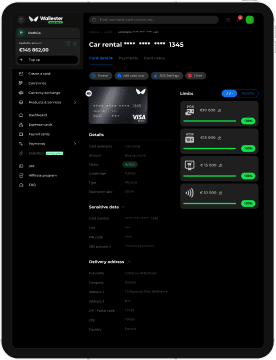
Administrators can set individual card limits and use freeze and closure controls. Employees can attach receipts or documents to transactions, while the business manages access through user roles and permissions. For a growing team, demonstrate these tasks with both an employee and the person who will administer the account.
Wallester's published Xero and QuickBooks Online guidance describes selecting the relevant accounts, mapping data, reviewing transactions and triggering the sync. Ask finance to verify the fields and receipt handling for its exact software configuration. Include any review or manual work in the trial scorecard.
The Free plan lists €0 per month, 300 included virtual cards and unlimited employee seats. Physical card issuance is included, while delivery and additional virtual cards carry charges. Check the current pricing and applicable price list for the operations your team expects to use.
This combination is worth evaluating for a business that wants company-funded employee purchasing with card controls and receipt collection. Account approval remains subject to checks. If borrowing is a requirement, assess a credit product separately; the Wallester Business debit card does not itself provide a credit line.
Explore Wallester Business and use the checklist to test it against your own purchasing and accounting requirements.
How to Choose Business Expense Cards
Mark the requirements that would prevent you using a provider. A field-service team may need physical cards and a clear lost-card process. A team managing online subscriptions may need several virtual cards and an owner for each recurring purchase. Finance may require a particular export format before it can adopt either setup.
Compare the total cost of that workload. Use the same number of employees and cards, the same billing period and the same purchase currencies for every quote. Add delivery and any separately charged operations. Record the assumptions so another person can check the calculation.
Choose a provider when your evidence shows that it meets every mandatory requirement. Keep optional features separate: an extra feature cannot compensate for a funding, acceptance or accounting requirement your business cannot meet.
Start with a Small Employee Rollout
- Name the administrator and the finance owner. Record who can issue cards, change access and deal with an exception.
- Confirm the funding process and select the first users. Issue the card format each person needs and set the appropriate limits.
- Give employees written purchasing instructions. Include receipt submission, lost-card reporting and a contact for declined payments.
- Review the first purchases with finance. Check transaction details, supporting documents and the accounting process before adding more users.
- Document offboarding. Review recurring supplier payments, retain the necessary records and remove access through the provider's process.
Closing a payment card does not cancel the contract with a subscription supplier. Update or cancel that service separately and check pending payments or refunds before completing the change.
Make the Decision on Tested Requirements
Take the completed scorecards into the provider discussion. A named owner and a dated test result make it easier to decide whether a requirement is satisfied or needs more work. Explore Wallester Business with your actual employee purchases in mind, then agree the first rollout with finance.
Frequently Asked Questions
An expense card describes a business use, while a credit card describes a funding arrangement. Check whether the product uses company funds or an agreed credit facility. Wallester Business cards are debit cards, so the card itself does not provide a credit line.
An employee normally receives a business expense card through their employer's authorised administrator. The business must complete the provider's account and cardholder checks. The administrator can then arrange the card and explain the spending rules and receipt process.
An eligible business owner can apply for a business account and use its cards for authorised business purchases, subject to the provider's checks. Wallester Business supports individual entrepreneurs as well as companies. Confirm that the business type, location and intended cardholder meet the applicable requirements.
The Wallester Business Free plan includes 300 virtual cards and unlimited physical card issuance. Additional virtual cards and physical-card delivery have separate charges. Check the current plan and price list before deciding how many cards to issue.
Wallester Business lets an authorised user set individual card limits through the platform or mobile app. Its Help Center describes daily and monthly limits for common payment methods. Check those controls against your company policy and demonstrate who can change them.
Employees should retain the receipt or other supporting document and record the business purpose required by their employer. Wallester Business supports attaching documents to transactions. Finance should check that the record and required attachments reach its accounting process and handle missing information before reconciliation.
Wallester Business provides integrations with Xero and QuickBooks Online. The published setup guidance includes account selection, data mapping, transaction review and a user-triggered sync. Test the fields and receipt handling with your exact software setup before relying on the connection for your accounting process.
Freeze a lost or stolen company card as soon as possible and tell the business administrator. Wallester's Help Center advises closing the card through the platform or app if it is not found quickly, with a replacement issued if needed. Review unfamiliar transactions and follow the provider's reporting process.