This article covers how Apple Pay and Google Pay work under the hood, what digital wallet APIs require from developers and businesses, how virtual cards fit into the mobile payment picture, and what to weigh up before integrating either solution.
Paying by phone turned into a daily habit around 2020: this trend is here to stay. Apple Pay and Google Pay now lead most checkout flows, both in-app and in-store. For any business processing card payments today, understanding how these wallets operate and what their APIs actually demand is less optional reading and more a prerequisite for staying competitive in the current world of finance.
Further Reading: How Virtual Card Technology Works
How do Apple Pay and Google Pay actually work?
Both wallets tokenise the user’s card details, replacing the actual PAN with a device-specific token. The merchant never sees the real card number; payment networks handle authorisation via that token instead.
The journey of a mobile payment begins with card provisioning. When a user adds a card to their phone, the wallet provider sends the data to the issuing bank and the card network. If approved, the network’s Token Service Provider (TSP) generates a unique Device Account Number (DPAN). This token replaces the Funding Primary Account Number (FPAN) found on the physical card.
When a transaction occurs, the phone does not send the DPAN alone. It generates a one-time dynamic cryptogram using a private key stored in the device’s Secure Element. This cryptogram proves that the specific device authorised the payment. The merchant passes this tokenised package to their acquirer, who forwards it to the card network. Only at this late stage does the network map the DPAN back to the original FPAN to verify funds.
Biometric authentication, such as Face ID or a fingerprint scan, adds an important layer of protection. These methods satisfy the requirement for Strong Customer Authentication (SCA) without adding the friction of a PIN or password. Since the merchant never touches the raw card data, the risk of a breach at the point of sale is significantly lower.
Q&A: Does the merchant store any sensitive card data when accepting Apple Pay?
No. The merchant receives only the token and transaction-specific cryptogram, so no PAN is stored on their side.
What is a digital wallet API and what does integration look like?
A digital wallet API is the technical interface that lets a merchant’s app or website request a payment from Apple Pay or Google Pay, passing transaction details and receiving a payment token in return.
Integrating these wallets requires interacting with platform-specific frameworks. For iOS apps, developers use the PassKit framework to handle the interaction between the app and the Secure Element. On the web, Apple Pay JS provides the necessary hooks to trigger the payment sheet within Safari. Google Pay relies on the Google Pay API for both Android and web environments.
The process starts with merchant registration. For Apple, this includes creating a merchant ID and a payment processing certificate. Domain verification is also a mandatory step for web implementations to confirm that the payment request originates from a trusted source. Google requires registration through the Google Pay & Wallet Console and an allowed origins list for web integration.
A standard integration sends a payment request object to the API. This object includes the currency code, country code, and a list of supported networks. Once the user authenticates, the API returns a payload containing the encrypted payment token. The merchant then sends this payload to their payment processor for decryption and authorisation.
Apple Pay vs Google Pay integration comparison
| Feature | Apple Pay | Google Pay |
| Native framework | PassKit (iOS/macOS) | Google Pay API (Android/web) |
| Web implementation | Apple Pay JS | Google Pay Web API |
| Merchant registration | Apple Developer + merchant ID | Google Pay & Wallet Console |
| Domain verification | Required (server-side file) | Allowed origins list |
| Test environment | Sandbox (separate Apple ID) | TEST environment flag |
| Supported networks | Visa, MC, Amex, Discover | Visa, MC, Amex, Discover |
| In-app provisioning | Yes (via PassKit) | Yes (via Push Provisioning API) |
Q&A: Can a single integration support both Apple Pay and Google Pay simultaneously?
Yes. Abstractions such as Stripe’s Payment Request Button or Braintree’s SDK handle both under one implementation, detecting the available wallet at runtime.
Where do virtual cards fit into mobile wallet payments?
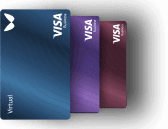
Virtual cards are card numbers generated programmatically, without physical plastic, that can be pushed into Apple Pay or Google Pay wallets, giving businesses precise control over spend limits, merchant categories, and card lifecycle. While consumers often use virtual cards for one-time purchases to hide their real data, the business value is much broader. Companies use virtual cards for employee expenses, allowing for instant issuance and strict budget caps.
The technical flow for pushing a card involves the issuer generating a push data packet. This packet is encrypted so only the specific wallet provider can read it. When the user taps ‘Add’ to Wallet in a business app, the app sends this packet to the Apple or Google servers, which then provision the token onto the device.
Q&A: Can a virtual card issued via API be added to Apple Pay without the cardholder manually entering details?
Yes, through in-app provisioning APIs provided by the card network and issuer, the card can be pushed directly into Wallet with a single tap.
What are the compliance and security requirements for mobile payment integration?
The fact that the merchant never handles, transmits, or stores the actual card number substantially lowers the PCI DSS compliance burden. Many of the strictest security controls do not apply to their server environment for this reason. This does not mean they are exempt from compliance, but it simplifies the annual assessment process.
In the UK and Europe, Strong Customer Authentication (SCA) is a legal requirement under PSD2. Mobile wallets are inherently compliant with these rules. Since the user must provide a biometric factor or a passcode on their device to authorise the transaction, the two-factor requirement is met automatically.
The security of these systems is built on EMVCo standards: the global body that manages chip-and-pin technology. Registering as a merchant with Apple or Google includes a verification process to confirm the legitimacy of the business.
Further Reading: Dynamic CVV Technology: Real-Time Security for Modern Issuers
Choosing between direct and gateway-based integration
Deciding whether to build directly against the wallet APIs or use a payment service provider (PSP) abstraction is a matter of resource and control. Direct integration offers the most flexibility for the checkout UI and removes any third-party fees, but it demands significant engineering time to maintain two separate codebases.
- Development resource available: direct integration demands native mobile expertise; gateway integrations typically need only a front-end developer familiar with JavaScript or the gateway’s SDK.
- Time to production: gateway-based routes can go live in days; direct PassKit integration on iOS requires Apple review for certain capabilities.
- Transaction volume and cost sensitivity: at high volume, gateway markup per transaction adds up; direct integration removes that layer.
- Multi-platform requirement: if you need Apple Pay, Google Pay, and Samsung Pay, a gateway abstraction saves significant duplication.
- Customisation needs: custom payment UIs or complex split-payment flows may outgrow what gateway SDKs expose.
Global spend through digital wallets is projected to surpass $16 trillion by 2028, with a significant jump in adoption expected during the 2025-2026 period. For many, the speed of a gateway integration is the better path to capture this market fast.
Further Reading: Authorisation flows in virtual card processing
Common integration pitfalls and how to sidestep them
Domain verification remains a frequent stumbling block for web-based payments. Apple Pay requires a specific validation file to be hosted on your server at a precise path. If your SSL certificate is not valid or the file is blocked by a firewall, the payment sheet will simply fail to load. Google Pay is more lenient but still requires an allowed list of origins to prevent clickjacking.
Testing environments also present challenges. You cannot test Apple Pay using a standard Apple ID. You must create a sandbox account and use specific test card numbers. Google Pay allows you to toggle a TEST flag in the API, but you still need to join their test group to see real payment sheets without charging a real card.
Common integration errors and resolutions
| Error | Platform | Likely cause | Resolution |
| Invalid merchant | Apple Pay | Merchant ID mismatch | Re-verify domain, check ID |
| DEVELOPER_ERROR | Google Pay | Malformed request | Validate against API schema |
| Decryption failure | Both | Certificate mismatch | Re-upload processor certificate |
| STATUS_CANCELED | Google Pay | User dismissed sheet | Handle as a UI state, not error |
| AbortError | Apple Pay (JS) | Page unloaded | Confirm session is cancelled |
A successful implementation must handle a variety of response codes. Understanding these is necessary for providing clear feedback to the user during checkout.
- Payment token: the encrypted data passed to your processor.
- Card network: identifies if the card is Visa, Mastercard, or another brand.
- Card details: contains the last four digits of the DPAN and expiry.
- Billing address: only present if you specifically requested it in the request.
- Shipping address: relevant for physical goods delivery.
- Contact info: email and phone number, if granted by the user.
How Wallester supports virtual card and wallet integration
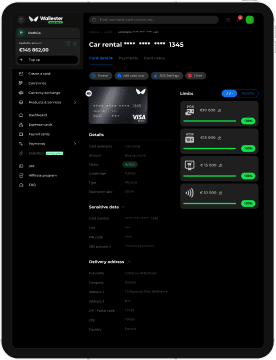
Wallester provides a reliable card-issuing and programme management platform for businesses looking to launch their own payment solutions. Wallester’s API allows for the instant generation of virtual cards, complete with granular spending controls and merchant category restrictions. This is particularly useful for companies building expense management tools or payout systems that require immediate liquidity.
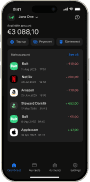
One of the standout features is the support for seamless provisioning. Wallester-issued cards are built to work with both Apple Pay and Google Pay out of the box. Through their push-provisioning API, your users can add their new virtual cards to their mobile wallets without ever leaving your app. Wallester also provides white-label capabilities, meaning the cards appear with your branding in the user’s wallet, helping to maintain a cohesive brand experience.
If you are building a card programme or looking to add virtual card issuance to an existing payment flow, Wallester’s API documentation and sandbox environment are a practical starting point.