


Managing your company’s finances just became significantly more efficient. With the release of our new accounting-software integration, Wallester Business users can now connect their accounts directly to two of the most widely used platforms in finance – Xero and QuickBooks Online. That means your transactions, categories, suppliers, VAT/tax codes and attachments can flow through a smarter workflow – reducing manual export/import steps and letting your finance team focus on meaningful work.
The challenge finance teams face
For many organisations, the expense-to-ledger loop remains cumbersome. The typical pattern looks like this:
- Cards are issued, spend happens across multiple accounts or teams.
- At month-end (or every week) someone exports CSVs or XLS files from a payment platform.
- The file is cleaned, categories adjusted, correct tax rates applied, then imported into the accounting system.
- Reconciliation driving late nights, spreadsheets, mismatches, missing attachments, lost time.
- The result: slower close, higher risk of error, frustrated finance teams.
Against this backdrop, the term “integration” is often used loosely. We’ve created a connection into your accounting system supported by a review-first workflow, preserving control while cutting the tedious steps.
What’s New at Wallester Business
Inside the Client Portal of Wallester Business you’ll now find a dedicated Integrations section (and complementary adjustments in Expense Management) that enable the following steps:
- Connect your accounting platform: Select Xero or QuickBooks and authorise the link from within the portal.
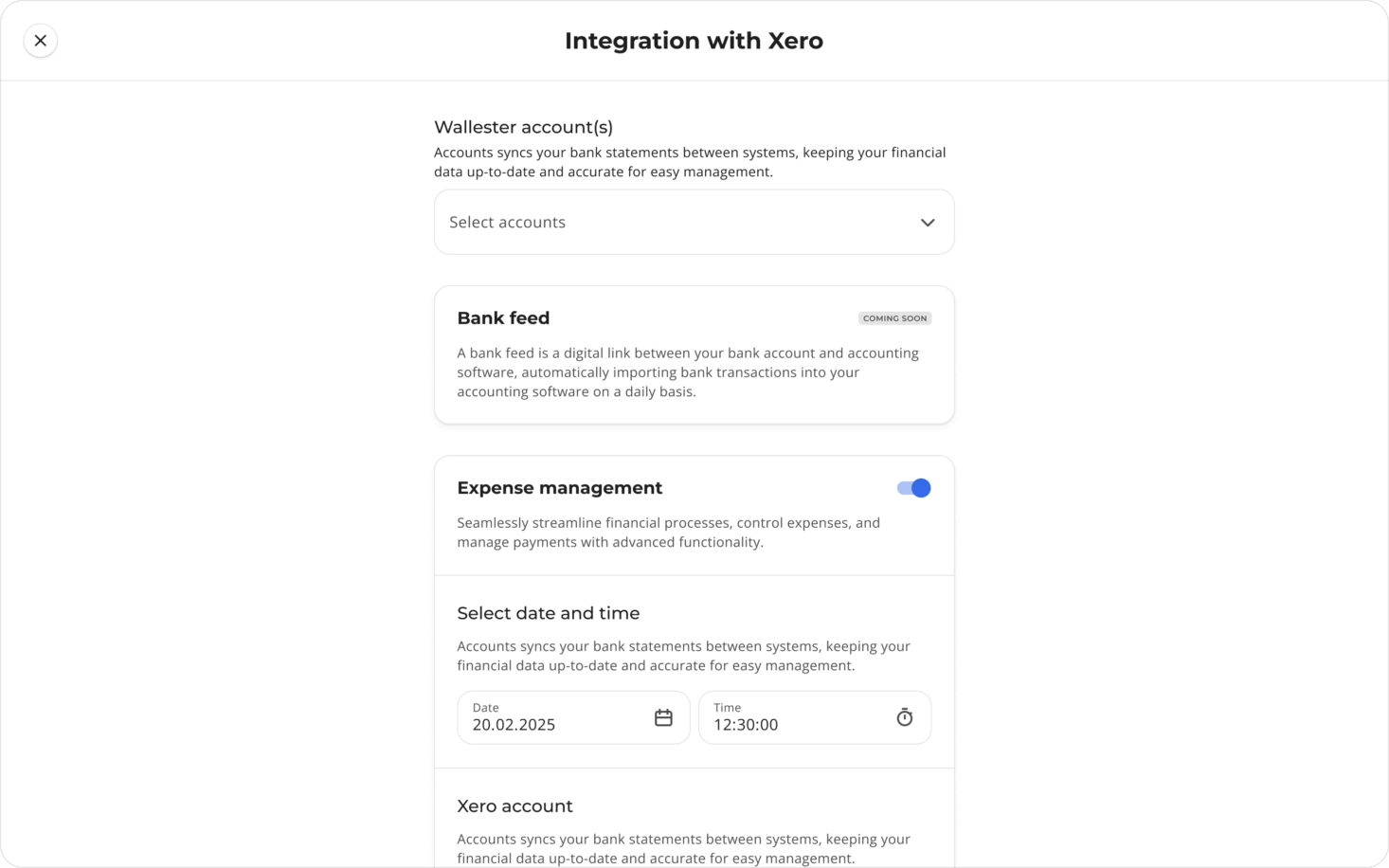
- Choose which Wallester accounts to sync: You pick the business accounts you want to include, and specify which you exclude.
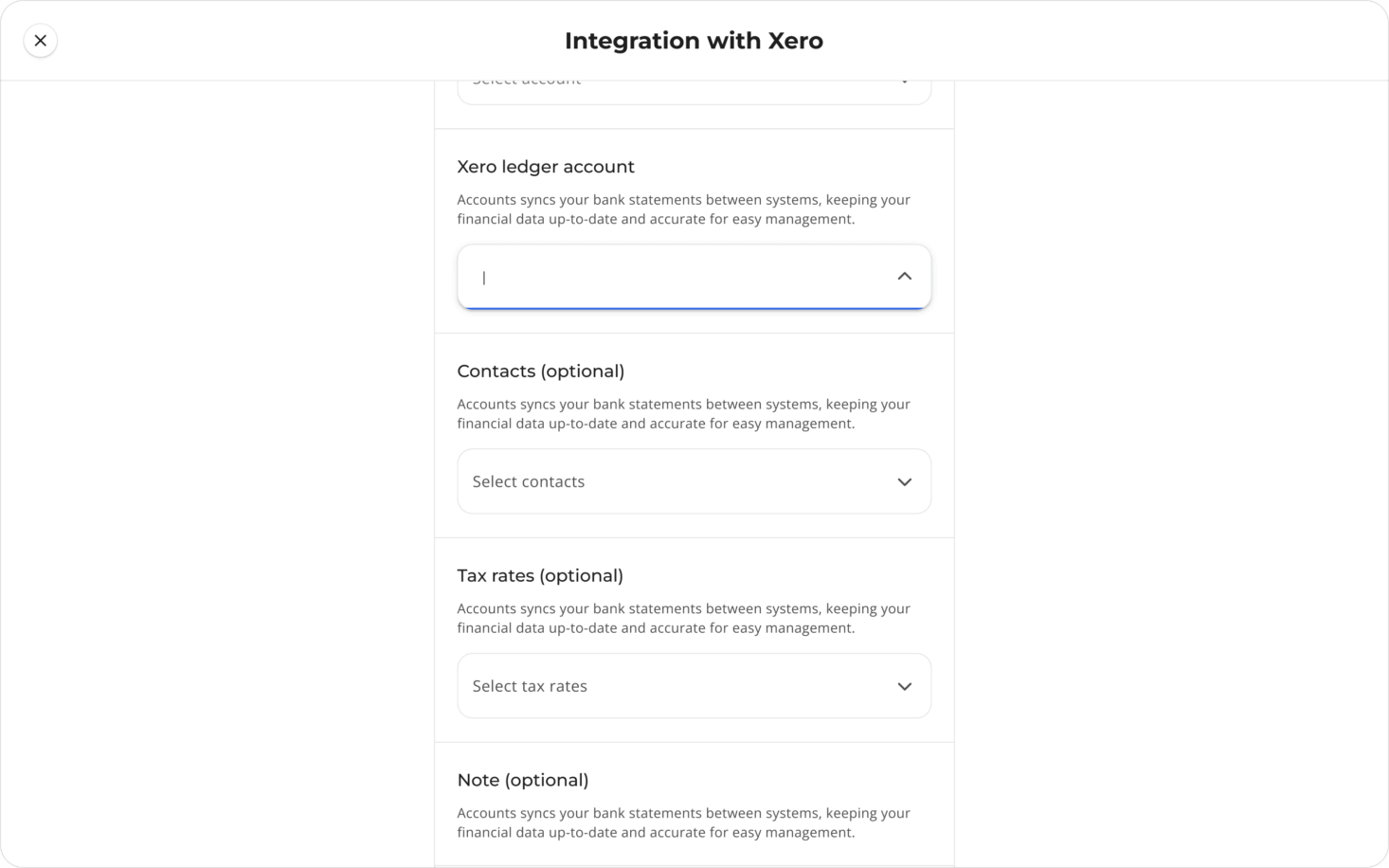
- Map your rules: Categories, suppliers (contacts), VAT/tax codes, attachment rules – all configured inside Wallester so the journey into accounting is clean.
- Review the transactions: In the Expense Management tab, transactions from the selected accounts and categories appear. Your team assigns tax rates, categories, contacts, and adds notes or attachments.
- Trigger Sync: Once review is complete (either per-transaction or in batches), you click SYNC, and the reviewed data flows into your chosen accounting software (Xero or QuickBooks), with all mappings applied.
This releases your team from exporting and re-uploading transactions, but crucially retains manual review before the accounting ledger receives your data.
Why this matters
Eliminate the export-import loop
Before: export from Wallester, clean the file, import into accounting system → high friction.
Now: choose accounts once, review once, click sync once. The repetitive loop is removed.
Less tech fuss, fewer transfer errors, fewer late-night fixes.
Improve accuracy and audit readiness
Because you map categories, suppliers, tax codes and attachments before hitting sync, the data arriving in Xero/QuickBooks is already enriched. That means fewer “please supply missing receipt” emails, cleaner audit trails, and stronger compliance.
Support faster monthly close
With fewer delayed spreadsheets and manual steps, you can close earlier, with confidence. Your ledger is aligned with your spending more rapidly, so financial leadership has a more current view.
Empower finance and admin teams
Rather than outsourcing data transfer to spreadsheets or ad-hoc tools, your team remains in Wallester’s portal until review is complete, then triggers the ledger upload. It keeps ownership in finance rather than across disconnected systems.
Who benefits – and how
This feature is relevant for multiple roles and business sizes:
- Financial Controllers / Finance Directors looking to cut reconciliation cycle time and reduce manual intervention.
- Operations or Admin Managers responsible for expense policies, card issuance, and ensuring all spend is captured and properly assigned.
- Founders / CFOs of fast-growing businesses where transaction volume is increasing, multiple user cards are in play, and accounting cycles need to scale.
- Startups and SMEs who may currently rely on basic export-import workflows and want to step up to a more structured process.
If your month-end still involves spreadsheets arriving at 6 pm on a Friday, this integration is a smart upgrade.
How to set it up (step-by-step)
- Log in to your Wallester Business Client Portal and navigate to Integrations.
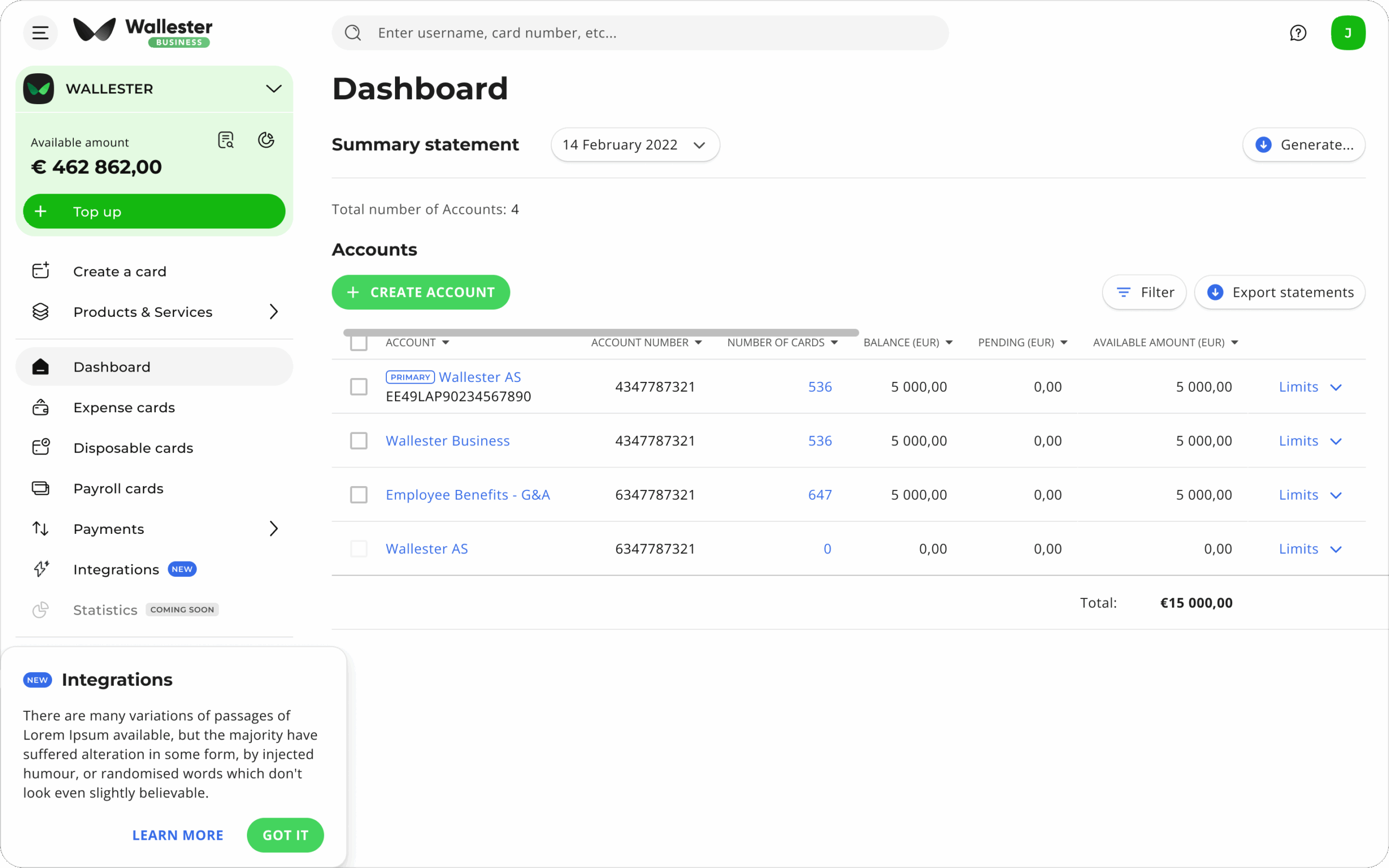
2. Select your accounting platform (Xero or QuickBooks), click Connect, and authorise the connection.
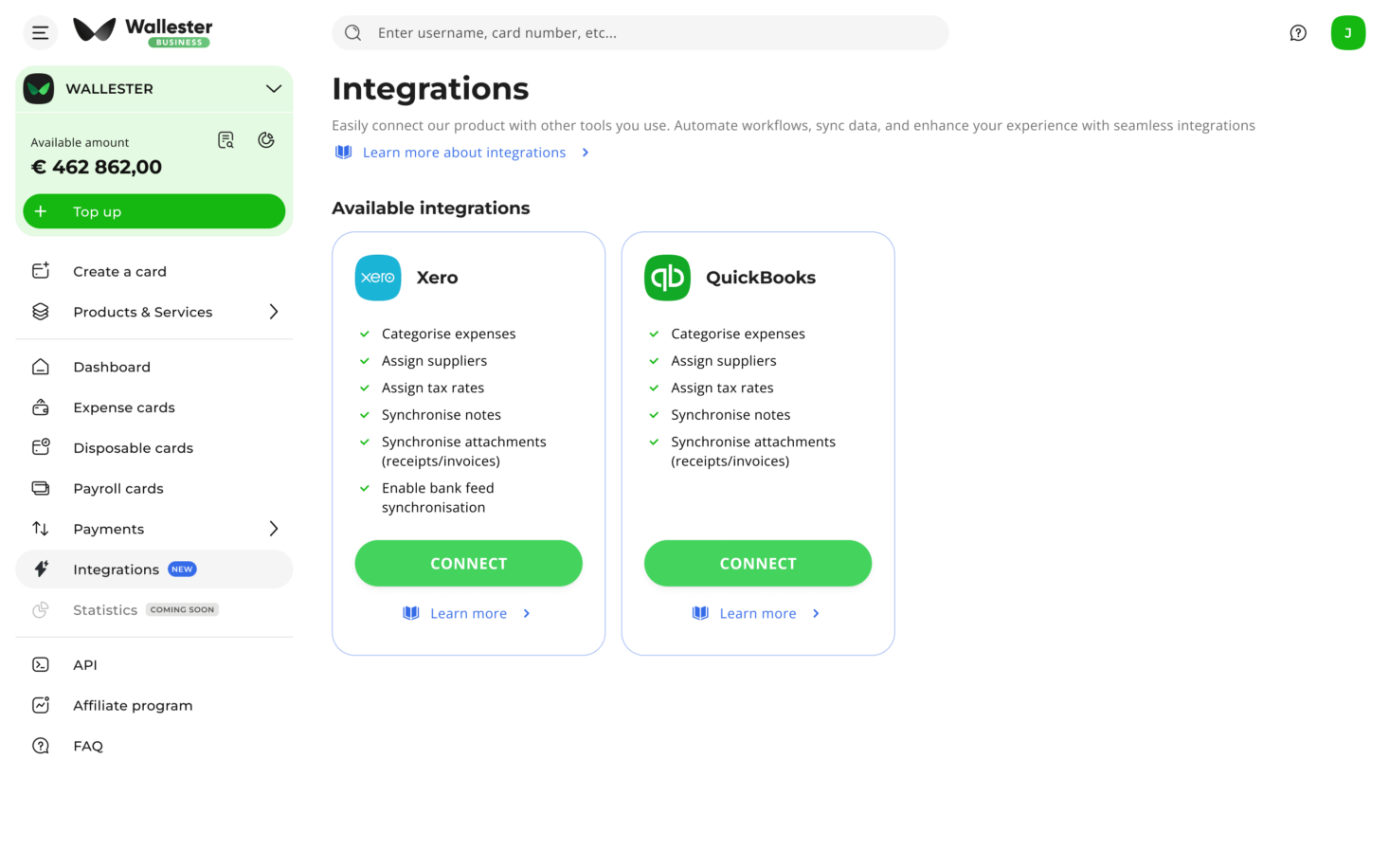
3. From Wallester, select which card accounts you want to include (and exclude those you don’t).
4. Still in the portal, map your categories, suppliers/contacts, VAT/tax codes, and attach rules for receipts/documents.
5. Go to the Expense Management tab: transactions from the selected accounts and categories begin appearing. Your team assigns necessary data (tax, category, contact, notes, attachments) exactly as part of their review workflow.
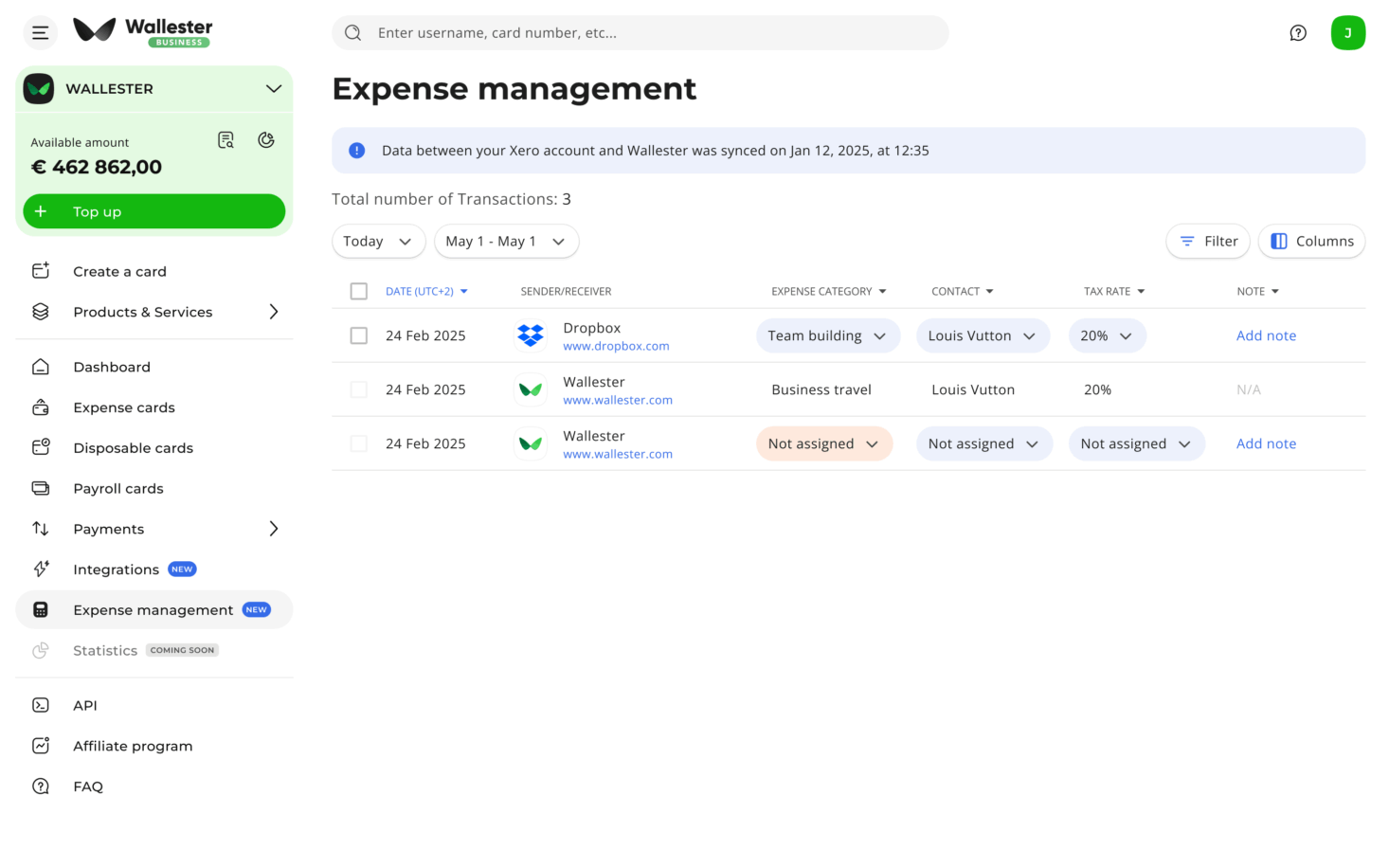
6. When the review is complete (per transaction or batch), click SYNC and the reviewed data is sent into your accounting system with mappings applied.
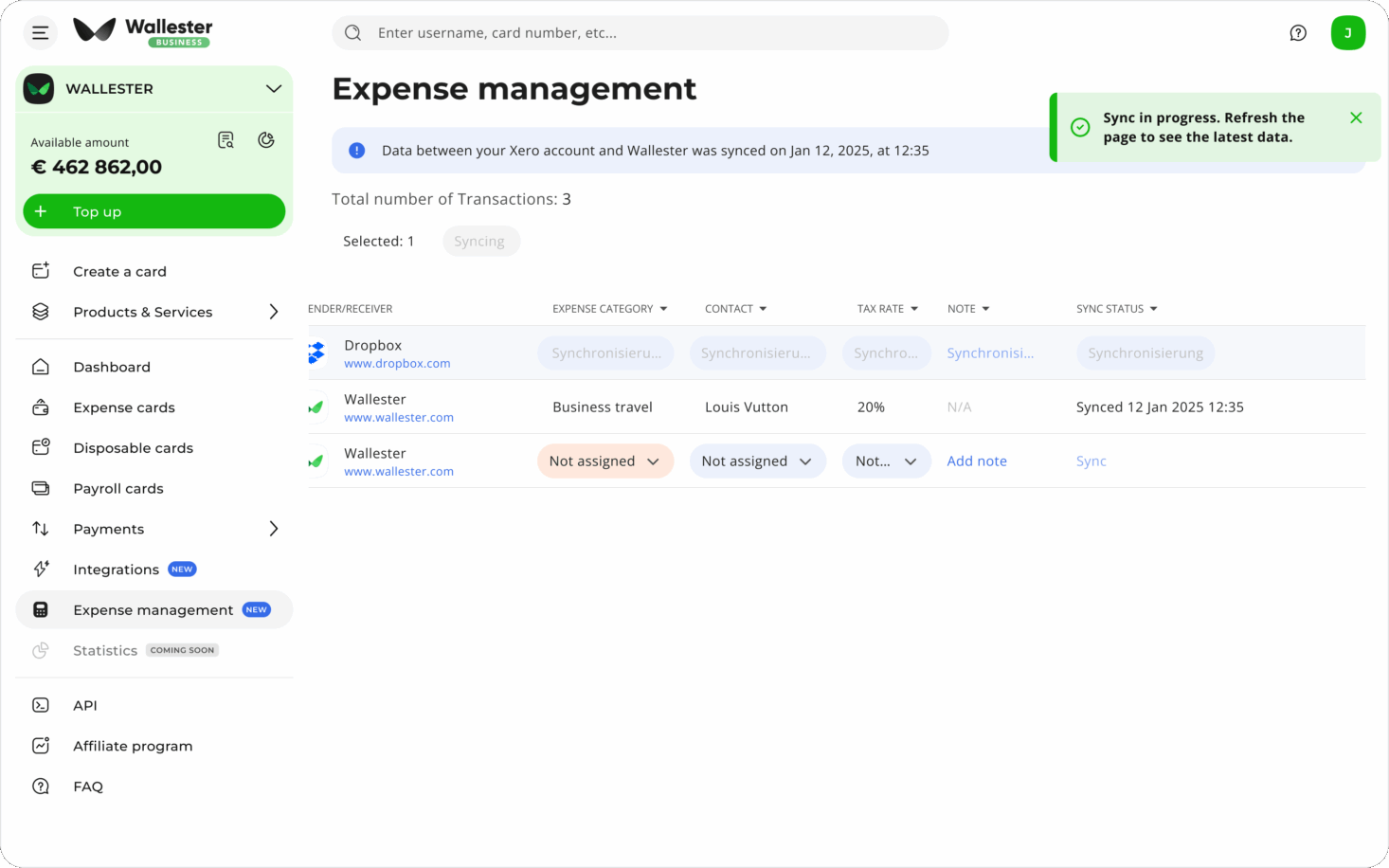
7. Manage and monitor the integration from the adjacent Expense Management tab going forward.
Frequently Asked Questions
Q: Does this mean everything syncs automatically?
A: No. You retain full review control. After mapping and reviewing, you trigger sync manually. This ensures quality before the ledger update.
Q: Can I exclude some accounts or only certain categories?
A: Yes. Within Integrations you decide which Wallester accounts to include, and within Expense Management you select which categories or accounts appear for review.
Q: Will attachments from Wallester show in Xero/QuickBooks?
A: Yes. When you attach receipts or documents to a transaction during review, those are included in the sync-upload so they arrive alongside the transaction in your accounting platform.
Q: What accounting software is supported initially?
A: At launch the integration supports Xero and QuickBooks Online. Support for additional platforms is on the roadmap.
Q: What happens if I forget to click sync?
A: Until you click Sync, the reviewed transactions remain in Wallester and are not yet posted in the accounting system. Review your workflow accordingly.
Looking ahead — What’s next
We’re not stopping at the launch. Here are some of the enhancements we’re working towards:
- Expand accounting software support beyond Xero and QuickBooks to cover other major platforms.
- Introduce more advanced controls: rule-based mappings (e.g., supplier → category auto-suggestion), recurring spend patterns and flagged exceptions.
- Improve the dashboard for integration health-metrics: pending reviews, sync success/failure, exceptions, reconciliation velocity.
- Enhance multi-entity and multi-currency capabilities when working across global operations.
Final word
If you’ve ever had to wrestle with CSV exports, manually cleaning data, importing into accounting software and reconciling late at night, you’ll appreciate this step-change. With Wallester Business’s accounting integration, you retain your review workflow, eliminate the export/import hassle and raise your finance team’s efficiency and accuracy.
Connect once, map once, review as standard – and then trigger sync into your ledger with confidence. Your finance team will thank you.

